What HTTP security headers actually buy you
By Stefan Schmitt · 2025-03-09
Drafted with AI; researched, edited, and fact-checked by me — how I write.
The cheapest security you'll ever add
Most security work touches application logic — validating input, scoping tokens, thinking carefully about what each request is allowed to do. HTTP security headers are the opposite of that. You set a handful of response headers, the browser enforces them on every page load, and you've closed off whole categories of attack without changing a line of how your app behaves.
That's the appeal: high leverage per line of config, and the work lives at the edge — a CDN rule, a server block, a few lines in your framework — not threaded through your codebase.
One caveat before the list, because it's the thing people get wrong: headers are defence in depth, not a substitute for the real fix. A Content-Security-Policy shrinks the blast radius of a cross-site scripting bug; it doesn't fix the bug. Treat these as the outer layers around code that's already trying to be correct.
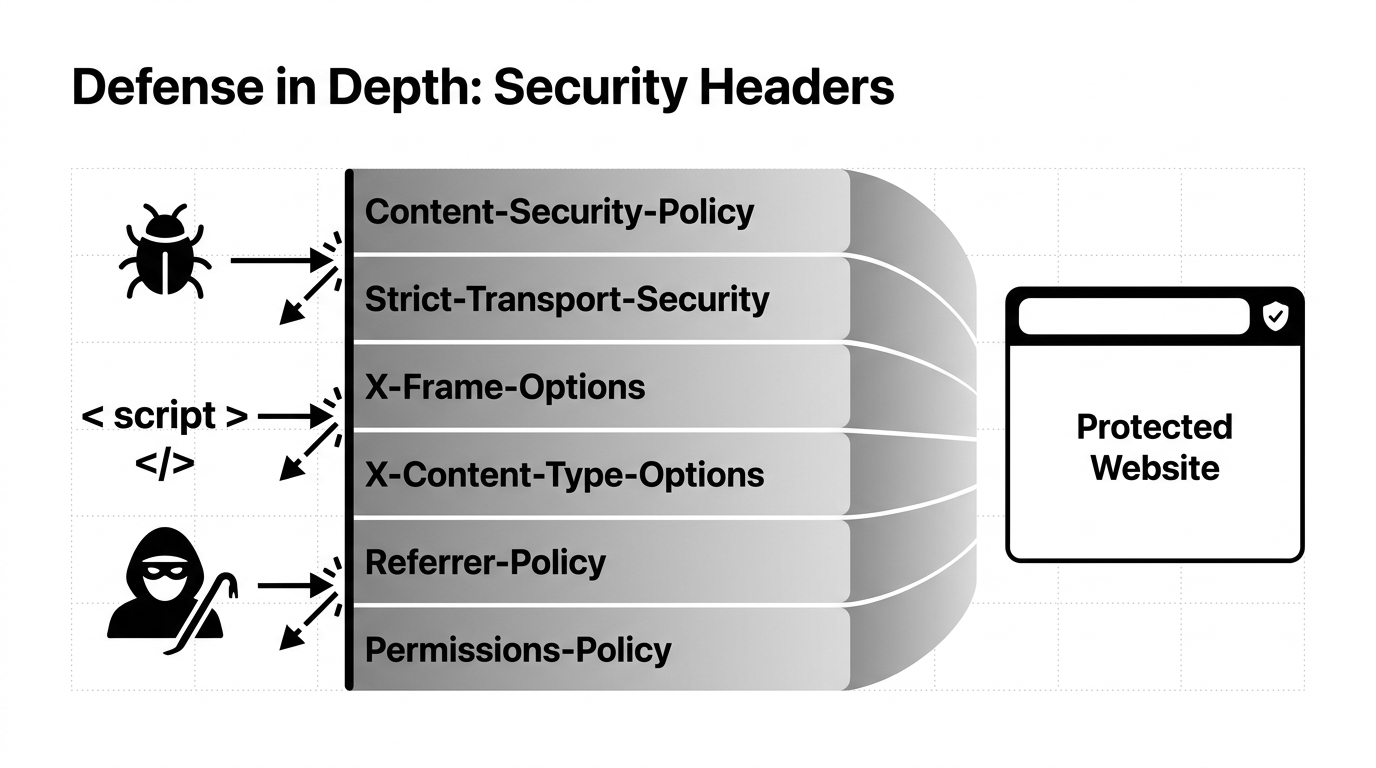
I'll go through them roughly in the order I'd add them, which is also roughly most-bang-for-the-buck first. The last one is the odd one out — it's the one I'd now remove.
Strict-Transport-Security — force HTTPS and keep it forced
Strict-Transport-Security: max-age=31536000; includeSubDomains
What it does. Known as HSTS, this tells the browser to only ever talk to your site over HTTPS for the duration of max-age (here, one year in seconds). Once a browser has seen this header, it upgrades any http:// request to https:// itself, before a single byte goes over the wire. includeSubDomains extends that promise to every subdomain.
What it stops. The downgrade attack. Without HSTS, a user's very first request — a bare domain typed into the address bar, or a stale http:// link — goes out in plaintext, and that plaintext request is exactly where a man-in-the-middle on hostile Wi-Fi strips the TLS and slides between the user and the server. HSTS removes the window: after the first visit, the browser refuses to even attempt HTTP.
The part worth thinking about. There's a preload directive and an associated browser preload list that closes even the first-visit gap. Your domain ships hardcoded into browsers as HTTPS-only.
That is genuinely stronger, but treat it as a commitment, not a flag. Getting onto the list is easy. Getting off it is slow. It also applies to every host under your domain. Add preload only when you're certain every subdomain you'll ever run can do HTTPS, indefinitely. Until then, a one-year max-age with includeSubDomains is the safe default.
Content-Security-Policy — the big one, and the most work
Content-Security-Policy: default-src 'self'
What it does. CSP tells the browser which sources it's allowed to load resources from — scripts, styles, images, frames, fonts, the lot. default-src 'self' is the blunt starting point: only load things from my own origin, nothing external.
What it stops. This is your strongest answer to XSS. If an attacker manages to inject <script src="https://evil.example/x.js"> into your page, a CSP that doesn't list that origin means the browser simply refuses to fetch and run it. It also shuts down exfiltration to unapproved domains.
The honest caveat. default-src 'self' is where you start and almost never where you finish. The moment you load analytics, a web font, an embedded video, or anything from a CDN, you need explicit allowlists: script-src, style-src, img-src, frame-src, and so on.
Inline <script> and style attributes stop working unless you allow them. The easy escape hatch, 'unsafe-inline', quietly hands back most of the protection you came for. A strong modern CSP uses per-request nonces or hashes plus strict-dynamic instead.
Of every header here, CSP is the one most likely to break your own site before it ever stops an attacker. Roll it out with Content-Security-Policy-Report-Only first. Watch what it would have blocked. Only then enforce.
One more: CSP's frame-ancestors directive is the modern, more flexible replacement for the next header on this list. If you're writing a CSP, set frame-ancestors there too.
X-Content-Type-Options — one line, no downside
X-Content-Type-Options: nosniff
What it does. Tells the browser to trust the Content-Type you declared and stop trying to guess ("sniff") a resource's real type from its bytes.
What it stops. MIME sniffing. If users can upload a file and you serve it back, an attacker can craft something you've labelled image/jpeg that actually contains JavaScript — and a sniffing browser that decides "this looks like a script" will run it. nosniff forces the browser to honour your declared type, so a file served as an image is treated as an image, full stop.
Why it's first to set. There's essentially no downside and nothing to tune. A single static value that closes a real hole. Set it everywhere and forget about it.
X-Frame-Options — don't let other sites wear your UI
X-Frame-Options: DENY
What it does. Stops your pages from being embedded in an <iframe> on another site. DENY blocks all framing; SAMEORIGIN allows only your own pages to frame each other.
What it stops. Clickjacking. The attack loads your real page in a transparent iframe over a decoy, so the user thinks they're clicking the attacker's harmless button while actually clicking your "delete account" or "authorise payment" control underneath. If your page can't be framed, the overlay can't be built.
The modern note. As above, CSP's frame-ancestors is the newer mechanism and it wins where both are present. X-Frame-Options is still worth sending for older clients, but if you're already writing a CSP, frame-ancestors 'none' (or a specific allowlist) is the real control.
Referrer-Policy — stop leaking your URLs
Referrer-Policy: strict-origin-when-cross-origin
What it does. Controls how much of the originating URL rides along in the Referer header when a user clicks through to another site. This value sends the full path for same-origin navigation, but only the bare origin (https://example.com, no path or query) when crossing to a different site — and nothing at all when downgrading from HTTPS to HTTP.
What it stops. Quiet privacy and data leaks. A URL like https://example.com/reset?token=secret should never hand that token to whatever external link the user clicks next. This policy makes sure only your origin leaves the building.
The nuance. This is already the default in modern browsers, so setting it explicitly isn't adding new behaviour so much as pinning it — guaranteeing the same posture on older clients and making the intent legible to anyone reading your config. Cheap to set, and it documents a decision you actually made rather than one you inherited.
Permissions-Policy — turn off the hardware you don't use
Permissions-Policy: camera=(), microphone=(), geolocation=()
What it does. Declares which powerful browser features your site — and anything embedded in it — is allowed to use. An empty allowlist, camera=(), denies that feature outright.
What it stops. Feature abuse, especially through third-party embeds. If your site never uses the camera, microphone, or location, saying so means a malicious ad or a compromised script can't quietly prompt for or reach those APIs. You're shrinking the attack surface to exactly what you need.
Worth knowing. This header replaced the older Feature-Policy, which used different syntax — if you find Feature-Policy examples online, they're dated. Deny the features you don't use; allow the few you do, scoped to your own origin.
X-XSS-Protection — the one to retire
X-XSS-Protection: 0
This is the header that's aged worst, and the advice you'll still find for it — "set 1; mode=block as a fallback" — is the part I'd push back on hardest.
It was meant to switch on a browser's built-in XSS auditor: a heuristic filter that tried to spot reflected scripts and neutralise them. The problem is the filter is gone. Chrome removed its XSS Auditor back in 2019, Edge followed when it moved to Chromium, and Firefox never shipped one at all. In a current browser, 1; mode=block does nothing.
Worse, while it was active the auditor became an attack surface in its own right. Its detection could be turned into a side channel to probe a page. Its blocking could be triggered to suppress legitimate content.
That's why the current recommendation, including from the OWASP Secure Headers Project, is to omit the header entirely or send X-XSS-Protection: 0 to explicitly disable any lingering legacy behaviour. The real protection against XSS is the Content-Security-Policy above, plus disciplined output encoding in your app. This header is a relic; treat it as one.
Putting it together
These all live at the response layer, so they're framework- and language-agnostic — an Nginx add_header, a Vercel or Cloudflare rule, or your framework's own header config all get you to the same place. Here's the full set wired into a Next.js config, since that's what this site runs on:
// next.config.ts
const securityHeaders = [
  { key: "Strict-Transport-Security", value: "max-age=31536000; includeSubDomains" },
  { key: "Content-Security-Policy", value: "default-src 'self'" },
  { key: "X-Content-Type-Options", value: "nosniff" },
  { key: "X-Frame-Options", value: "DENY" },
  { key: "Referrer-Policy", value: "strict-origin-when-cross-origin" },
  { key: "Permissions-Policy", value: "camera=(), microphone=(), geolocation=()" },
  { key: "X-XSS-Protection", value: "0" },
];

export default {
  async headers() {
    return [{ source: "/:path*", headers: securityHeaders }];
  },
};
Tune the CSP to your real dependencies before you ship it — that one line will block your own analytics and fonts exactly as written.
Then check your work, because a header you think you set and a header the browser actually receives are different things. curl -I https://yoursite.example shows you exactly what's going over the wire, and a scanner like securityheaders.com grades the set and flags what's missing. I'd rather see the response than trust the config.
None of this replaces getting the application itself right. But for the effort — a dozen lines, set once, enforced by every visitor's browser — it's the best security-per-keystroke trade you'll find. Set the six that earn their place, retire the one that doesn't, and verify what actually ships.
If this is your kind of thing, the newsletter is where I write up the rest.