Diffable Datasource with Core Data
By Stefan Schmitt · 2023-01-19
Diffable data sources changed how I think about updating a list. Instead of telling a collection view how to mutate — insert these index paths, delete those, and hope the counts line up — you hand it a snapshot describing the data as it is now, and UIKit works out the diff and animates it. The crashy performBatchUpdates bookkeeping just goes away.
Core Data makes this more interesting, because a snapshot is built from identifiers, and those identifiers have to stay stable as objects come and go. Here's how the two fit together, and the three shapes of the problem I keep running into.
A snapshot — NSDiffableDataSourceSnapshot<Section, Item> — is just a list of section identifiers and, under each, the item identifiers. Both have to be Hashable.
The Core Data trick is the choice of Item. Don't put the managed object in the snapshot. Put its NSManagedObjectID there instead. It is stable, hashable, and safe to pass around, and you resolve it back to a live object in the cell provider.
The other half is getting changes in. Since iOS 13, NSFetchedResultsController hands you a ready-made snapshot every time the fetched results change.
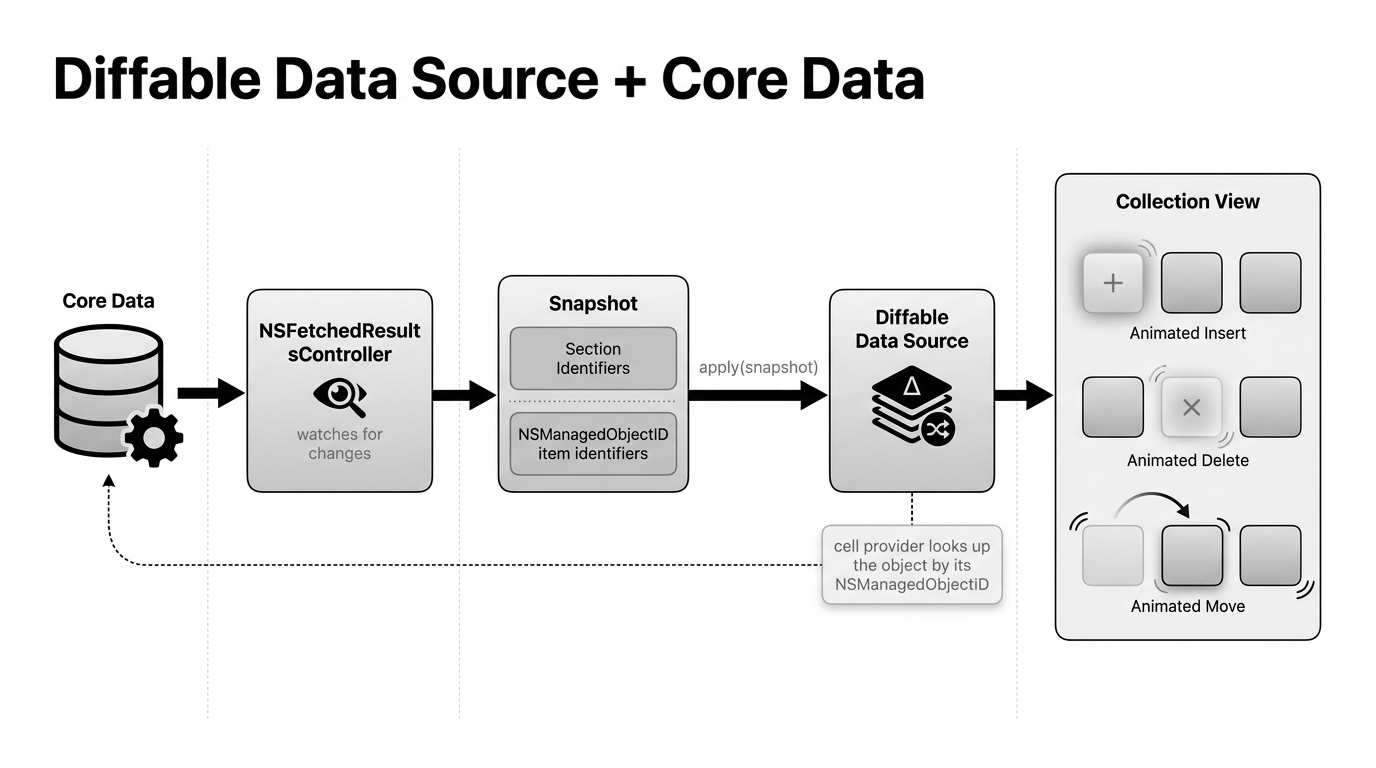
That bridge is most of the code:
let dataSource = UICollectionViewDiffableDataSource<String, NSManagedObjectID>(
    collectionView: collectionView
) { collectionView, indexPath, objectID in
    let object = try? context.existingObject(with: objectID)
    // configure and return a cell from `object`
}

// NSFetchedResultsControllerDelegate
func controller(_ controller: NSFetchedResultsController<NSFetchRequestResult>,
                didChangeContentWith snapshot: NSDiffableDataSourceSnapshotReference) {
    dataSource.apply(
        snapshot as NSDiffableDataSourceSnapshot<String, NSManagedObjectID>,
        animatingDifferences: true
    )
}
Set up the fetched-results controller, become its delegate, and every insert, update, and delete in Core Data flows through to an animated UI update. What changes between the three examples below is mostly how the sections are modelled.
Single Entity & Single Section ↴
The baseline: one entity, one section. Give the fetched-results controller a sectionNameKeyPath of nil and the snapshot it produces has a single section — a flat list that animates itself as the store changes.
frc = NSFetchedResultsController(fetchRequest: request,
                                 managedObjectContext: context,
                                 sectionNameKeyPath: nil,
                                 cacheName: nil)

// in controller(_:didChangeContentWith:) — collapse everything into one section
var snapshot = NSDiffableDataSourceSnapshot<String, NSManagedObjectID>()
snapshot.appendSections(["Memories"])
snapshot.appendItems(databaseSnapshot.itemIdentifiers, toSection: "Memories")
dataSource.apply(snapshot, animatingDifferences: true)
Single Entity & Multiple Sections ↴
Same entity, but grouped — say tasks split by status, or contacts by first letter. Set the controller's sectionNameKeyPath to the attribute you want to group by (and sort by it first), and it produces one section per distinct value. The snapshot's section identifiers are those group names; you didn't write any grouping logic yourself.
frc = NSFetchedResultsController(fetchRequest: request,
                                 managedObjectContext: context,
                                 sectionNameKeyPath: "type",
                                 cacheName: nil)

// the controller already grouped by `type`, so apply its snapshot directly
dataSource.apply(snapshot as NSDiffableDataSourceSnapshot<String, NSManagedObjectID>,
                 animatingDifferences: true)
Multiple Entities & Multiple Sections ↴
This is the one that doesn't fit a single fetched-results controller, because an FRC fetches one entity type. Here you run one controller per entity and build the snapshot yourself.
Each controller contributes its own object IDs. You append those IDs under that entity's section, then apply the merged snapshot. Once you're mixing entity types, owning the snapshot directly is the clearer path.
// one controller per entity, merged on every change
var snapshot = NSDiffableDataSourceSnapshot<String, NSManagedObjectID>()
snapshot.appendSections(["Memories", "Plans"])
snapshot.appendItems(memoriesController.fetchedObjects?.map(\.objectID) ?? [],
                     toSection: "Memories")
snapshot.appendItems(plansController.fetchedObjects?.map(\.objectID) ?? [],
                     toSection: "Plans")
dataSource.apply(snapshot, animatingDifferences: true)
The payoff is the same across all three: no index-path math, no batch-update crashes, and animations that follow your data for free. The full example view controllers are linked under each section.